Healthy Recipe Creator Instagram Carousel: A Template for Food Brands
More Than Just Slides: Building a Culinary Brand
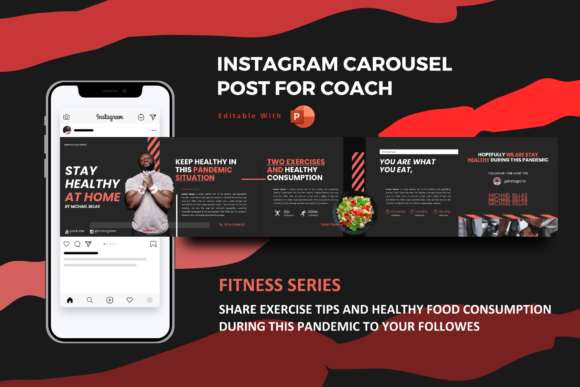
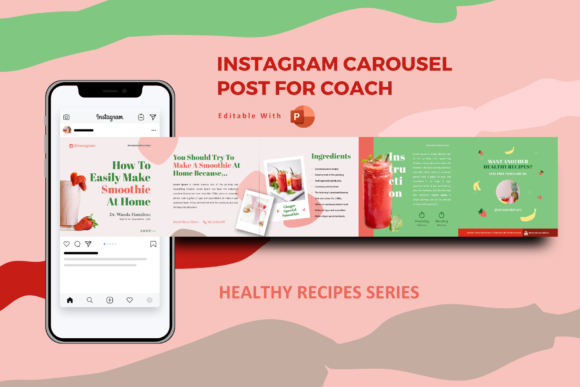
In the crowded space of social media, a single static image often gets lost. For anyone in the food industry—be it a nutritionist, a meal prep service, or a health-focused blogger—engagement is the currency. The Healthy Recipe Creator Instagram Carousel is not just a PowerPoint template; it is a strategic tool designed to hold that currency. At its core, this template utilizes the "swipe" mechanic of Instagram carousels to tell a story. Instead of a chaotic dump of information, you guide your audience through a narrative: the introduction of a dish, the ingredients, the step-by-step process, and the final, appetizing result. This structure is proven to boost algorithm performance, as longer dwell times on your posts signal high-quality content to platforms like Instagram and TikTok.
Visually, the template embraces a personality of clean sophistication. It avoids the clutter that plagues many recipe infographics. The design relies on a modern typography aesthetic, balancing negative space with high-quality imagery. The "personality" of the slides is approachable yet authoritative—it looks professional enough for a corporate wellness seminar but warm enough for a personal cooking blog. The color palettes offered are curated to evoke freshness and health, utilizing earth tones, vibrant greens, and clean whites that make food photography pop. It is a premium font and layout experience that translates directly into perceived value for your audience.
Strategic Applications: Beyond the Instagram Feed
While the name suggests a specific use case, the versatility of the Healthy Recipe Creator Instagram Carousel extends far beyond social media. Because the package includes PPTX, PPT, and THMX files, it functions as a robust design asset for multiple channels. For the entrepreneur or small business owner, this template is an excellent starting point for product presentation. Imagine pitching a new line of organic sauces or a catering service to investors. Instead of dry, text-heavy slides, you present a visually driven story using the same drag-and-drop ease intended for Instagram.
The template serves various professional needs:
- Agency & Marketing: Marketing agencies can use this to mock up social media graphics for clients before committing to a full design sprint. It allows for rapid prototyping of brand identity concepts.
- Editorial Design: Bloggers and publishers can repurpose carousel slides into Pinterest pins or embed them directly into web articles as visual guides, enhancing web design and user experience.
- Portfolio Building: For designers, customizing this template is a quick way to populate a portfolio with packaging design or editorial design projects that look client-ready.
- Corporate Wellness: Companies can use the slides for internal newsletters or annual reports regarding employee health initiatives, adding a touch of creativity to standard corporate communications.
The Power of Visual Hierarchy and Typography
One of the most critical aspects of this template is how it handles text. The files come equipped with free font recommendations that are chosen specifically for their legibility and style. In the world of modern typography, a sans serif font is often the hero for digital readability. The clean lines of a sans serif ensure that ingredients and instructions are legible even on smaller mobile screens. However, the template likely pairs this with a script font or a stylized display font for headers. This creates a visual hierarchy that guides the eye.
When you use a handwritten font or a decorative serif font for the title of a recipe, you evoke emotion and personality. When you switch to a clean sans serif for the "how-to" section, you prioritize function and clarity. This interplay is essential for brand perception. If the text is too hard to read, the user swipes away. If it is too boring, they don't save the post. This template strikes that balance, acting as a creative font playground where the typography supports the message rather than distracting from it.
Practical Guide to Customization and Editing
For the hobbyist or crafter who might feel intimidated by design software, the Healthy Recipe Creator Instagram Carousel is built on a "drag and drop" philosophy. You do not need to be a professional graphic designer to achieve professional results. The structure is intuitive: select a slide, replace the placeholder image with your own high-resolution photo (sourced from sites like Unsplash.com or your own camera), and edit the text.
Here is how to get the most out of the template:
- Evaluate Fit: Before editing, look at the color options. Do the existing themes match your brand? If you are a vegan cafe, the "fresh green" theme works. If you are a high-protein meal prep company, you might want to adjust the colors to deeper, bolder tones.
- Font Pairing: While the free font used in the template is a great starting point, don't be afraid to experiment with font pairing. If you change the header font, ensure the body font remains highly legible. A good rule of thumb is to pair a bold display font with a lightweight sans serif.
- Image Consistency: The template provides the framework, but your photography provides the soul. Ensure your images have similar lighting and styling across all five slides to maintain a cohesive brand identity.
- Licensing: Always check the documentation. The template is ready for commercial use, but ensure the images you drop into it also have the correct licensing for your specific project, whether personal or commercial.
The "Master Slides" feature is particularly useful here. By editing the master slide, you can apply global changes to fonts and colors, ensuring that every slide in your carousel maintains the consistency and professionalism required for a strong digital presence.
Maximizing Engagement with Carousel Strategy
The true value of the Healthy Recipe Creator Instagram Carousel lies in how it facilitates user engagement. The five-slide structure is not arbitrary; it is a storytelling arc. Slide 1 is the hook—the stunning final dish. Slide 2 might be the ingredients list, which encourages users to pause and read (increasing dwell time). Slides 3 and 4 are the process, offering value. Slide 5 is the call to action or a "save for later" prompt.
This format works because it mimics how we actually process information. It breaks down complex recipes into digestible chunks. For the marketer or content creator, this is gold. It turns passive scrollers into active participants. By using this PowerPoint template, you are adopting a format that has been statistically proven to outperform single-image posts in terms of shares and saves. Whether you are a designer creating assets for a client or a publisher